
Your first week
For: Advertisers and media buyers who have just launched a campaign.
New campaigns need time to learn. This page shows what to check during the first 7 days, how to read the numbers, and when to make a change. By the end of the week you will know whether to optimise, scale or stop.
1. What to check, and when
| When | Check | Healthy looks like |
|---|---|---|
| First 2 hours | Status and impressions | Status is Live; impressions are going up |
| Day 1 | Spend, impressions, clicks and CTR (Visit Rate for Pop) | Spend is close to your daily budget; clicks, or visits for Pop, are coming in |
| Day 2 | Registrations | Registrations appear in Analytics |
| Day 3 | Best and worst creatives (CTR or Visit Rate, registrations) | Some creatives clearly lead |
| Days 4–6 | Spend pacing, creative ranking | The campaign spends most of its daily budget; the weakest creatives are paused |
| Day 7 | CPA in the Cohort view, against your target | You can decide: optimise and scale if CPA is on target, adjust one lever if it is close, or stop if it is far off |
2. Where to find your numbers
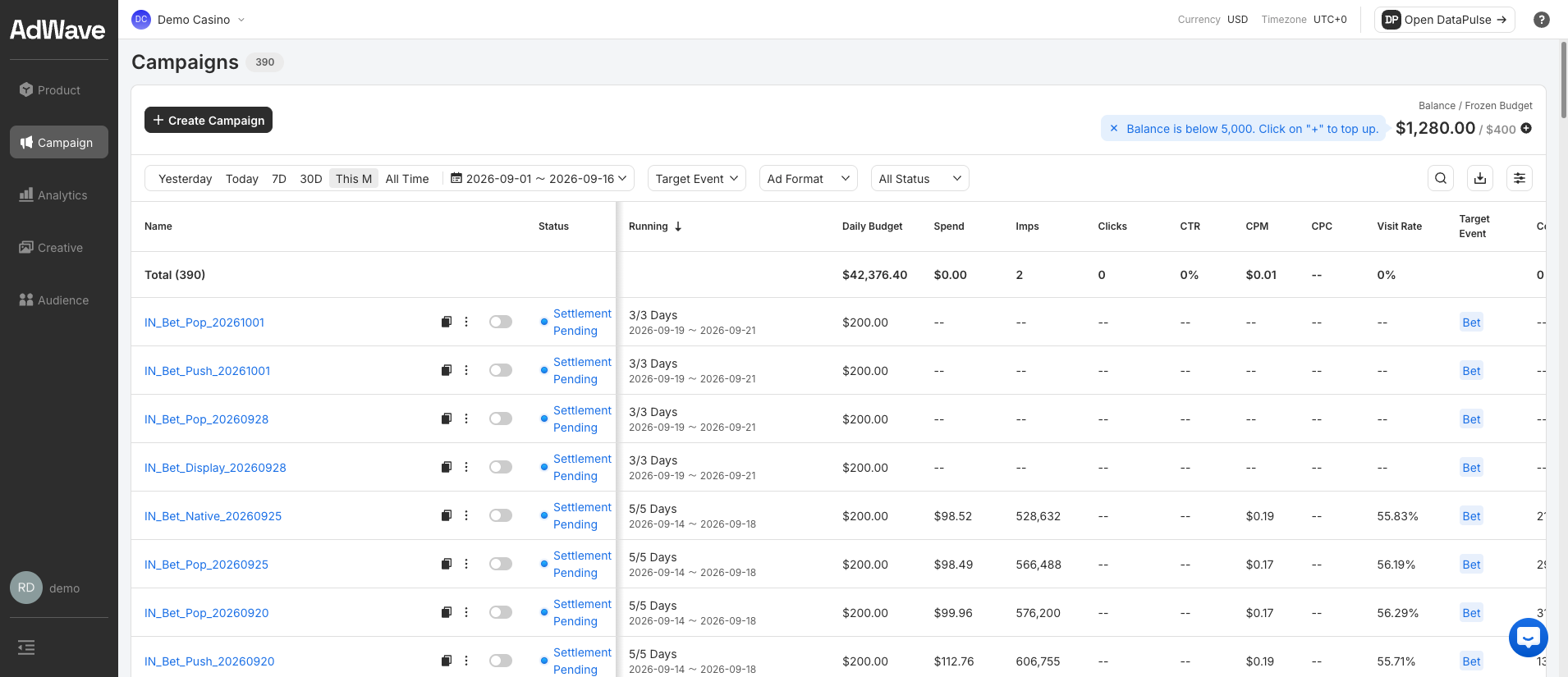
Campaigns shows delivery for each campaign: status, daily budget, spend, impressions (Imps), clicks, CTR, CPM, CPC and Visit Rate.
Pop ads open your landing page directly, so there is no click to count, and Clicks and CTR show --. For Pop, use Visit Rate instead of CTR.
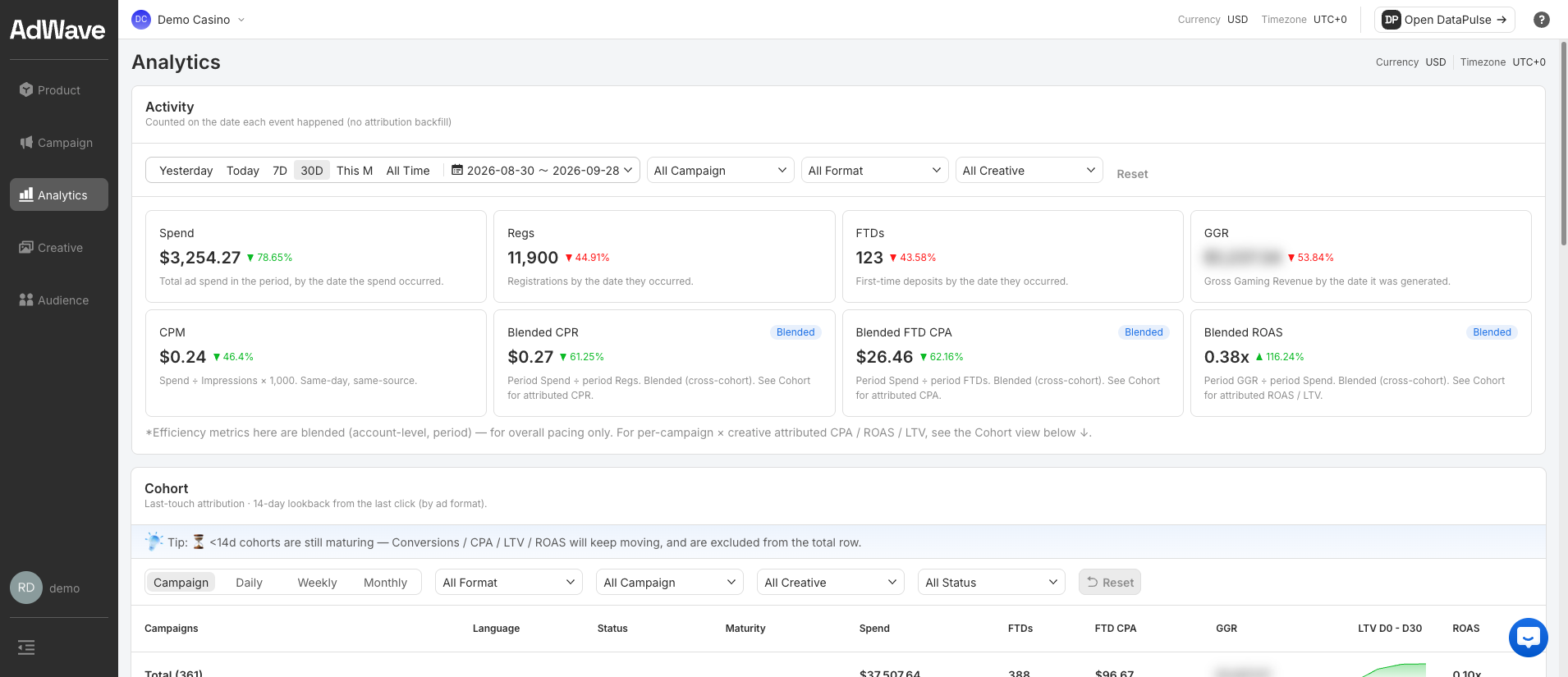
Analytics shows results: spend, registrations (Regs), first-time deposits (FTDs), GGR (gross gaming revenue), and blended costs.
Two ways of counting
- Activity counts each event on the day it happened. Use it to watch pacing.
- Cohort credits each conversion to the campaign that brought the player (last click, 14-day window). Use it to judge a campaign's real CPA. Cohorts less than 14 days old are still maturing, so their numbers will keep moving.
3. Diagnose common problems
| What you see | Likely cause | What to do |
|---|---|---|
| No impressions after a few hours | Bid too low, targeting too narrow, or wallet empty | Check your balance; raise the bid by 10–20%; add geos |
| Impressions, but spend is far below budget | Bid too low for the market | Raise the bid in small steps (about 10–20%) |
| Impressions, but very few clicks (low CTR) | The creative is not working | Add new creatives with a different offer or visual; pause the weakest |
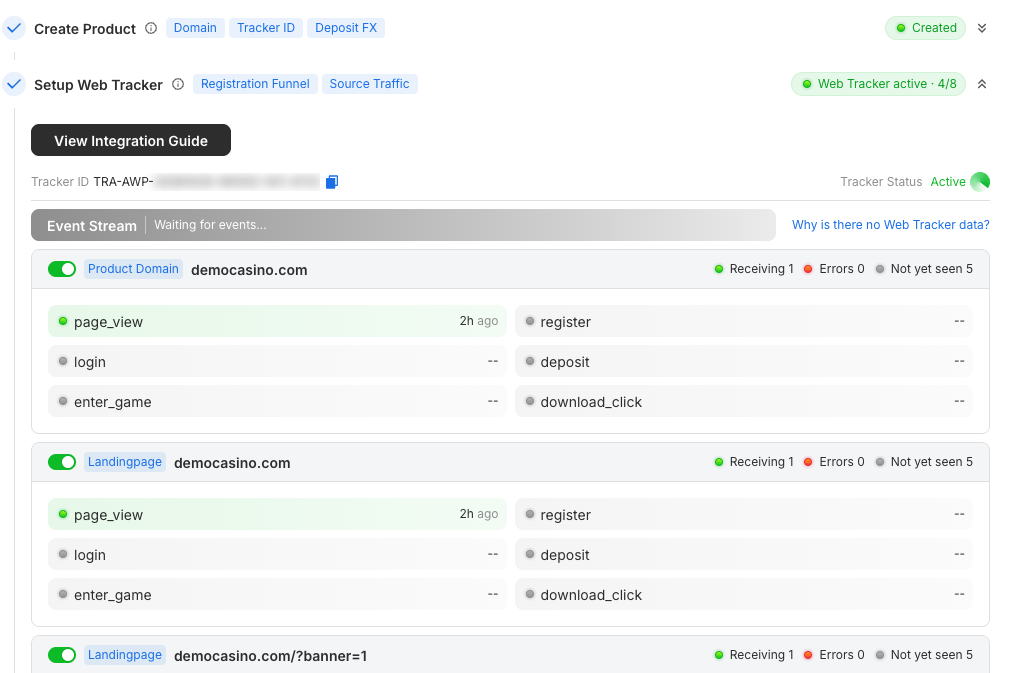
| Pop: impressions, but a low Visit Rate | The landing page loads too slowly, or the Web Tracker is missing from it | Check the page loads in under 2 seconds on mobile data, and that page_view arrives in the Event Stream |
| Clicks or visits, but no registrations | Landing page or tracking problem | Open the page on a phone and check it loads fast and matches the ad; check register arrives in the Event Stream |
| Registrations in your back office but not in RevoSurge | Tracking gap | Check the Web Tracker is on every landing page domain and that register fires on sign-up |
| Registrations, but no deposits | Deposit tracking missing, or players are low quality | Confirm deposit events arrive (S2S or Partner Postback); review the offer and geos |
| Campaign stopped | Wallet ran out or end date reached | Check Balance at the top right of the Campaign page and ask your Account Manager to top up; check the schedule |
Need to check what your site is sending? Watch the Event Stream in Product → Setup Wizard, or see Web Tracker → Verify in the portal.
4. Rules for changes
- Wait 24 hours before changing anything, unless nothing is delivering.
- Change one thing at a time, so you know what caused the result.
- Change bids in small steps, about 10–20% at a time.
- Pause, don't delete, creatives that underperform, so you keep their data.
- Check CPA on day 7, not before. Early CPA swings a lot while the campaign learns. Wait for a full week of data, and use the Cohort view.
- Make the big call on day 7. One week of data is the minimum to decide whether to scale, change the offer, or stop.
Next: Optimise and scale