Creatives
For: Advertisers and designers preparing ads for a first campaign.
Your creatives are the ads players see. AdWave tests your creatives against each other, moves budget to the best ones and retires the ones that stop working. The more variety you give it, the faster it finds winners.
1. How many creatives you need
Prepare 8–10 creative sets before launch.
- Faster learning: AdWave learns more quickly when your creatives are clearly different.
- Lower CPA: more options mean more room to find cheaper conversions.
- Less fatigue: you can rotate sets when one stops performing.
Keep it fresh
When a creative's CTR or conversions start to fall, add 2–3 new sets every 2 weeks.
2. What makes a creative set
A creative set is a version of your ad that differs from the others in at least one of these ways. Start with offers and messages that already convert well on your site.
| Dimension | Examples |
|---|---|
| Offer | 100% first-deposit bonus, 50 free spins, 2% cashback, VIP program, limited-time event |
| Theme | Slots, Crash, live casino, sports betting, poker |
| Message | Jackpot size, fast withdrawals, safe and licensed, new-player exclusive, countdown |
| Visual | Live dealer or model, game screen, big-win screen, sports star |
| Localisation | Language, local games, local payment methods, local festivals |
Test one thing at a time. Find the best offer first, then test angles for that offer, then visuals.
3. Specs by ad format
| Format | What to provide | Specs |
|---|---|---|
| Pop | Landing page URL | No image. Pop opens your landing page directly. One URL per offer, in the right language |
| Push | Brand logo + image + title + description | Logo: JPG/PNG, 192×192, ≤ 200 KB. Image: JPG/PNG, 360×240, ≤ 720 KB. Title ≤ 30 characters, description ≤ 40 characters (emojis do not count) |
| Display | Banner image | GIF/JPG/PNG, ≤ 500 KB. Start with 300×250, 300×100, 320×50. AdWave also accepts 728×90, 468×60 and 160×600 |
| Native | Image + title + description | JPG/PNG, ≤ 500 KB. Size: 300×250 |
Use animation for Pop and Display
Animated creatives (GIF for Display) usually get more clicks and conversions. For small banner sizes, redesign the layout instead of shrinking the large one.
Every creative should include the legal text each market requires, such as 18+, Play responsibly and T&Cs apply.
4. Example first round
An example for the Malaysia market with 2 offers in 3 languages (EN / ZH / MY):
| Format | What to test | Sets |
|---|---|---|
| Pop | 2 offers × 2 visuals (live dealer, game screen) | 4 |
| Display | 2 offers, each in 300×250, 300×100 and 320×50 | 2 |
| Push | 2 message angles (countdown, big win) | 2 |
| Total | 8 sets, about 28 files |
See Creative Requirements & Examples for visual previews of each format.
5. Upload and manage creatives
You add creatives while you create your campaign. You can also upload and review them any time in Creative in the left menu.
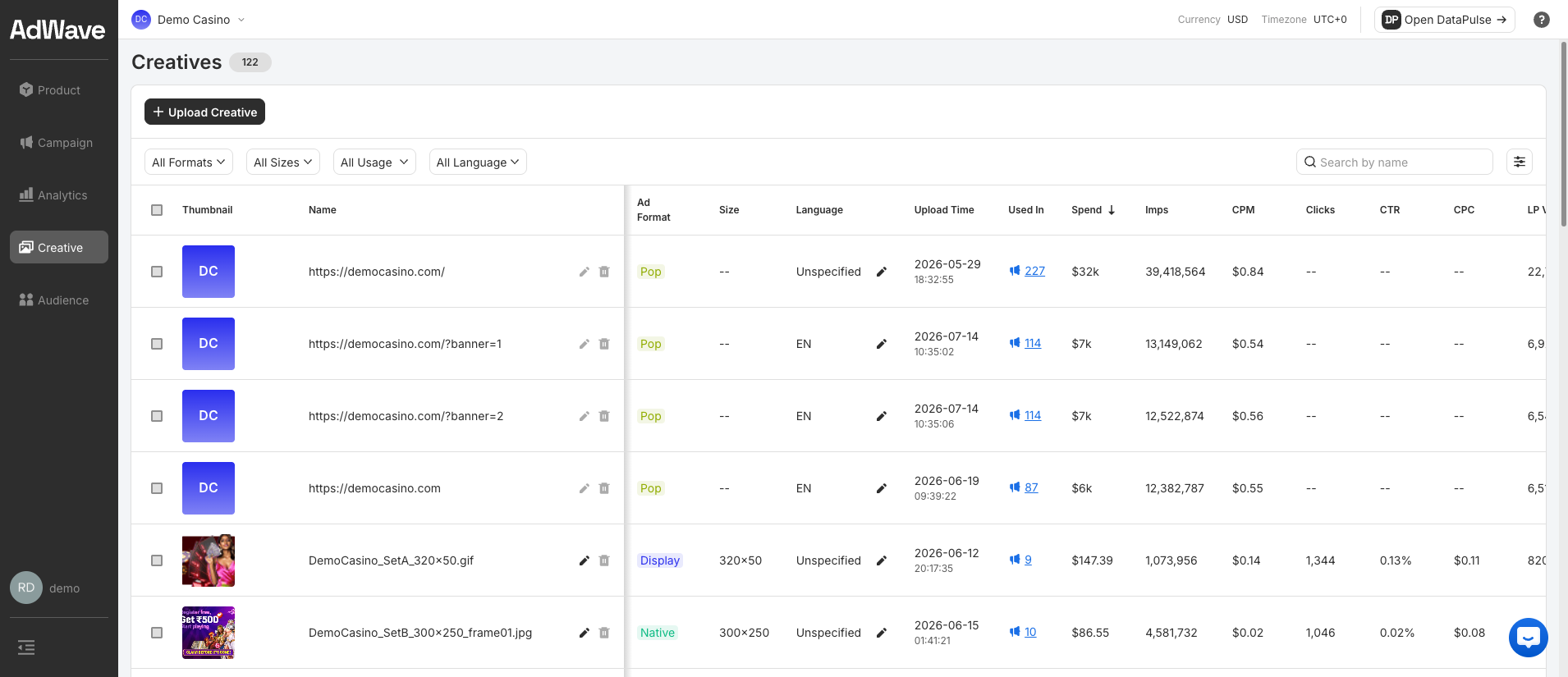
Pop creatives are listed by their landing page URL. Use the filters (All Formats, All Sizes, All Usage, All Language) to find creatives, and sort by Spend or CTR to see which ones work.
Set the language on every creative
Creatives marked Unspecified are harder to compare by market. Click the pencil icon in the Language column to set it.
Next: Create your campaign