
Tracking overview
For: Advertisers, media buyers, UA managers, developers, affiliate and partner managers
RevoSurge optimises your campaigns against the conversions you send us. This page explains how to set that up: create a Product, decide what you are optimising for, then connect the methods that carry it.
Coming from Meta or Google? Start here
Most of what you already know maps one-to-one. The names change; the model does not.
| You already know | On RevoSurge |
|---|---|
Meta Pixel · Google gtag.js | Web Tracker — same idea, one script, six events |
| Conversions API · GA4 Measurement Protocol | S2S Server Events (v3) — your backend POSTs to us |
| Standard events (Purchase, CompleteRegistration) | The event catalog — 24 events: 9 Standard, 15 iGaming |
fbclid · gclid | identity.click_id — capture it on landing and pass it back |
| Advanced Matching · Enhanced Conversions | context.privacy.email_hash / phone_hash — SHA-256, same as theirs |
Purchase value + currency | context.amount + context.currency — required on deposit |
| Test Events · Tag Assistant | S2S test mode — send X-Test-Mode: true and review what you sent for 14 days, outside reporting. ?dryrun=1 on any endpoint returns the full verdict and stores nothing |
event_id deduplication | Partner Postback: event_id, with a documented priority ladder. S2S: context.transaction_id on money events |
Three things that will be new to you:
- The iGaming catalog. Deposits, bets, KYC, bonuses, VIP tiers and sessions are first-class events, not custom conversions you have to define yourself. This is what makes bidding on player value possible.
- iGaming events are enabled per Product. Unlike a Meta standard event,
depositdoes not work the moment you send it — RevoSurge enables the iGaming preset for your Product first. See 7. The event catalog. - Partner Postback has no equivalent. If your conversions live in an affiliate platform's back-office rather than your own backend, you can integrate without writing any code. See 2.2.
1. Create your Product
Nothing else works until this exists. A Product is your website or app as RevoSurge sees it. Creating one registers your domain and issues the credentials every method depends on: a Tracker ID for the Web Tracker, and an API key for S2S.
Go to Product → Manage Product in either portal:
| Portal | URL |
|---|---|
| AdWave | adwave.revosurge.com/product |
| DataPulse | datapulse.revosurge.com/product |
One Product, both portals
AdWave and DataPulse share the same Product list. Create it in one and it appears in the other — you do not create it twice. The Open DataPulse / Open AdWave button top-right switches between them.
A Setup Wizard at the top of the page walks you through the whole integration in order and gates each step on the one before it. Steps 2–4 read Locked · Complete Step 1 first until your Product exists.
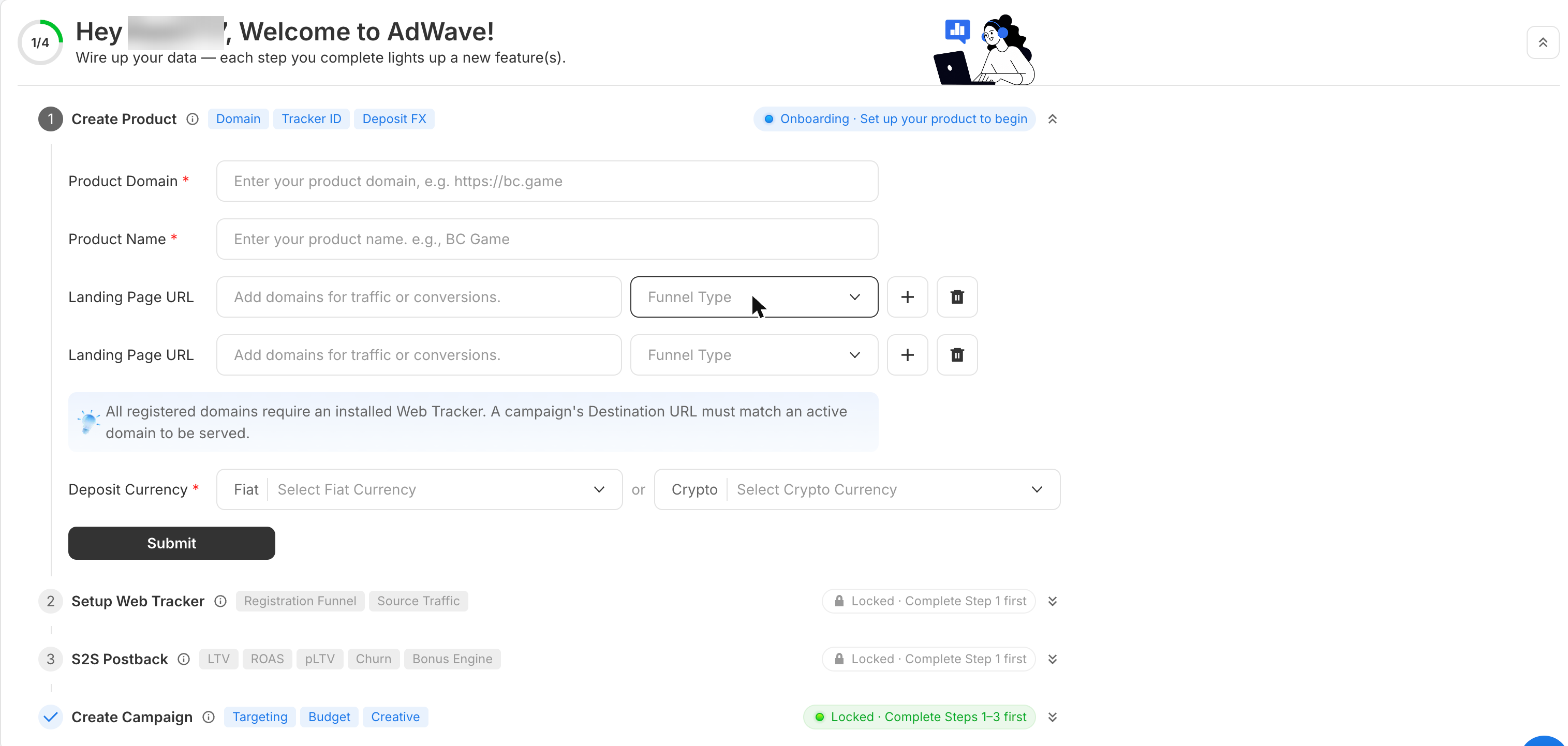
1.1 Fill in the form
Click + Create Product, in the Setup Wizard or above the Manage Product table.
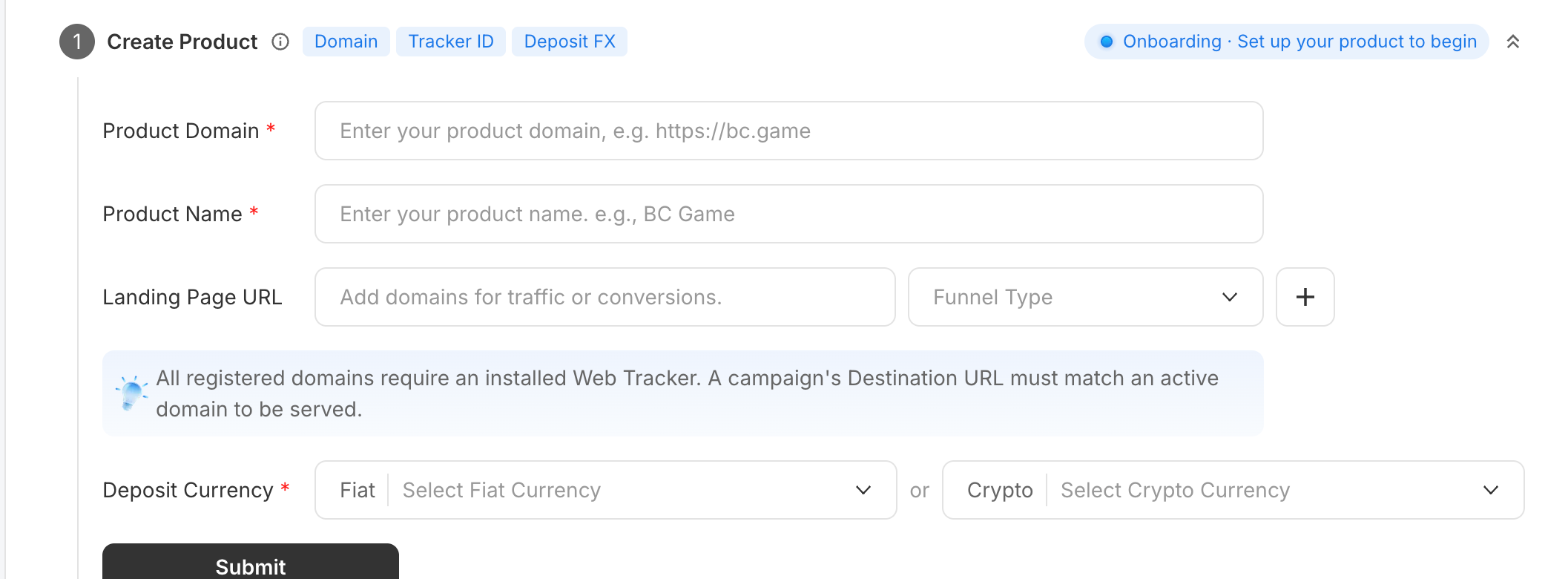
| Field | Required | What to enter |
|---|---|---|
| Product Domain | Yes | Your main domain including the scheme — https://yourbrand.com. This is what RevoSurge attributes traffic to. |
| Product Name | Yes | A human-readable label. Used in reports and the product switcher. |
| Landing Page URL | No | Any additional domain or URL you send paid traffic to. Pick a Funnel Type for each. + adds a row, the bin icon removes one. |
| Deposit Currency | Yes | The currency your deposits settle in — Fiat (searchable) or Crypto. Every amount we report is converted into it. |
Then click Submit. The wizard advances to 1/4 and Step 1 reads Created.
Register every domain you advertise to
All registered domains require an installed Web Tracker. A campaign's Destination URL must match an active domain to be served.
Point a campaign at a domain that isn't registered here and it will not serve. Add pre-landers, mirrors and redirect domains now.
Pick the deposit currency your back office actually settles in
Every amount we report is converted into it. If it doesn't match what you settle in, your totals and ours will differ by whatever the exchange rate moved. Crypto-settling operators should choose crypto, not the fiat equivalent.
1.2 Choose the right Funnel Type
Each Landing Page URL needs a Funnel Type so RevoSurge knows what the page is for.
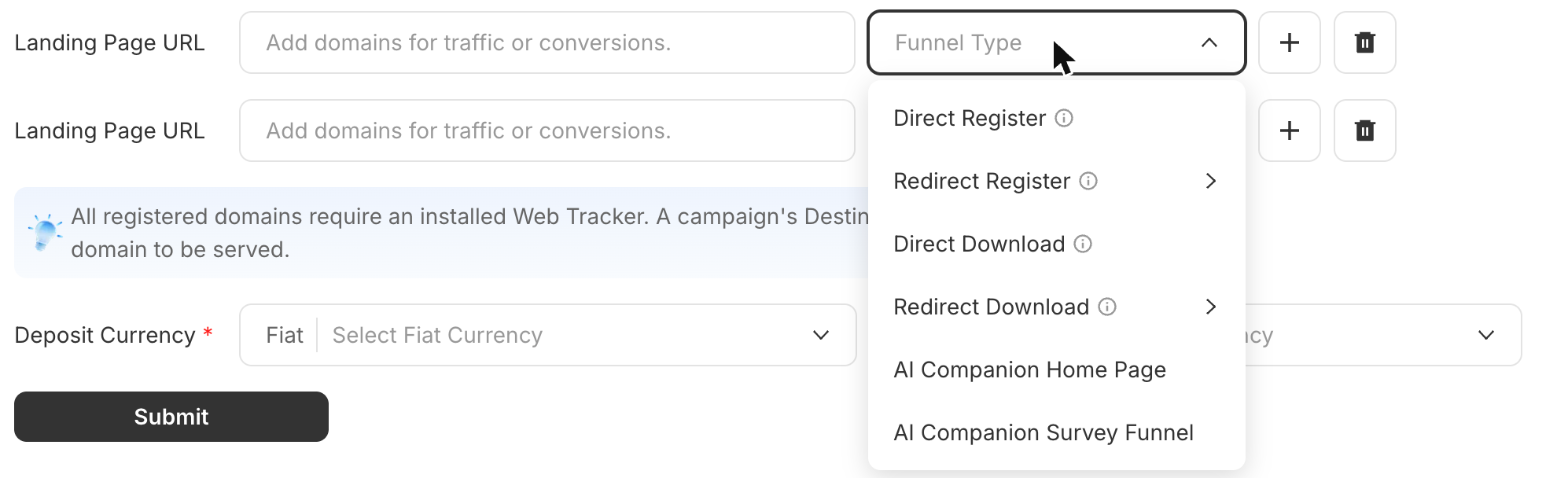
| Funnel Type | Use when |
|---|---|
| Direct Register | Visitors register directly on this landing page. |
| Redirect Register | This page redirects to a register page. Register both URLs under the same Product. |
| Direct Download | Visitors download the app directly from this page. |
| Redirect Download | This page redirects to an app download page. Register both URLs under the same Product. |
| AI Companion Home Page | The home page of an AI Companion product. |
| AI Companion Survey Funnel | A survey-style AI Companion acquisition funnel. |
Redirect types need a Direct page first
Redirect Register and Redirect Download stay greyed out until you have added at least one Direct landing page URL — the portal says "Add a Direct landing page URL first." Add the destination page, then the redirect.
1.3 What you get
| Identifier | Format | Used for |
|---|---|---|
| Product ID | AWP-20260827-052659-007-3119 | Internal reference, support tickets |
| Tracker ID | TRA-AWP-20260827-052659-007-3119 | Goes in the Web Tracker snippet |
The Tracker ID is the Product ID with a TRA- prefix.
2. Choose your setup
RevoSurge supports four integration methods — Web Tracker, S2S Server Events, Partner Postback, and AppsFlyer. You will use more than one, and almost nobody uses all four.
So which combination suits you? Let us answer that with three questions of our own.
| Question | What your answer decides | |
|---|---|---|
| 2.1 | Where do your players land? | Whether AppsFlyer is in the picture at all |
| 2.2 | Which system holds your conversion data? | Partner Postback or S2S — these are alternatives, not additions |
| 2.3 | What do your campaigns optimise for? | How deep you go, and which events you send |
Answer all three and the routing table gives you your setup. Skip straight to it if you already know them.
2.1 Where do your players land?
| A website | Web Tracker carries the click and the browser events |
| A mobile app | You also need an MMP. RevoSurge integrates with AppsFlyer |
| Both | Both of the above — they run side by side, on the same Product |
An app-install campaign without an MMP cannot attribute installs. The app store sits between the click and the install, and nothing we control can see across it.
2.2 Which system holds your conversion data?
This is the question most setups get wrong, because it is about who can send the event, not about what you would prefer.
| Where deposits and registrations are recorded | Method | What it needs from you |
|---|---|---|
| Your own backend — your platform confirms the payment | S2S | A developer, ~2–5 days |
| An affiliate platform's back-office — Income Access, Affilka, MyAffiliates, or your own affiliate system | Partner Postback | Someone with access to that platform's postback settings. No engineering. |
| Your MMP — in-app events already flowing to AppsFlyer | AppsFlyer postbacks | Configuration in AppsFlyer, plus permissions on the RevoSurge tile |
Pick one source of truth per event
S2S and Partner Postback do the same job. If both report the same deposit, precedence applies — see Core concepts → Deduplication — but you are paying twice to build the same thing, and reconciliation gets harder, not easier.
Run both only when they genuinely cover different events or different brands.
If you have engineering resource and an affiliate platform, choose S2S. It is the only method that carries amounts and bet, so it is the only one that will still be enough when your goals deepen.
2.3 What do your campaigns optimise for?
You do not pick a tracking method. You pick what your campaigns optimise for, and that decides how deep the setup has to go.
- App installs — volume of new installs
- Registrations — volume of new accounts
- First deposits — number of first-time depositors
- Deposit value — bid on how much they deposit
- Player value — GGR and LTV over time
Pick every goal that applies. They are cumulative: optimising for player value does not mean you stop counting registrations. Read down to your deepest goal — that row sets the floor, and everything shallower comes with it.
The routing table
Find the row matching your three answers.
| Lands on | Deepest goal | Data lives in | Your setup | Effort |
|---|---|---|---|---|
| Web | Registrations | The browser | Web Tracker | Same day |
| Web | First deposits | An affiliate platform | Web Tracker + Partner Postback | Same day |
| Web | First deposits | Your own backend | Web Tracker + S2S (Basic) | ~2–3 days |
| Web | Deposit value | Your own backend | Web Tracker + S2S (Basic, with amounts) | ~2–3 days |
| Web | Player value — GGR, LTV | Your own backend | Web Tracker + S2S (Full catalog) | ~3–5 days |
| App | Installs | Your MMP | Web Tracker (click forwarding) + AppsFlyer | ~3–5 days |
| App | Registrations, in-app events | Your MMP | The above + AppsFlyer in-app event postbacks | ~3–5 days |
| App | Deposit value or player value | Your own backend | The above + S2S | ~3–5 days on top |
| Web and app | Any | Mixed | Web Tracker + AppsFlyer + whichever of S2S or Partner Postback matches your back office | Sum of the rows above |
The Web Tracker is required in every setup
It is what captures the ad click in the first place. No other method sees which ad brought the visitor — and on the app side, it is also what forwards your clicks to AppsFlyer.
3. The four methods
3.1 Web Tracker — browser-side
A JavaScript snippet on your site. It reports what happens in the browser — page views, registrations, logins, deposits, game entries, download clicks — and captures the attribution context: which ad, which source, which landing page.
- Implemented by: your web developer
- Credential: Tracker ID (
TRA-AWP-…) - Guide: Install the Web Tracker
3.2 S2S Server Events — backend-side
Your backend POSTs events to our API. Nothing runs in a browser, so nothing is lost to ad blockers, tracking prevention or a closed tab.
This is where money belongs. A deposit your payment provider confirmed is a fact your server holds with certainty; the browser may never have seen it.
- Implemented by: your backend developer
- Credential: API key, sent as the
X-API-KEYheader - Guide: Server-to-server (S2S) overview
3.3 Partner Postback — your platform calls us
A URL your back office or affiliate platform calls when a conversion happens. You paste it in; they fire it. No engineering.
- Implemented by: you, or your affiliate platform admin
- Credential: postback key, sent as the
kquery parameter - Guide: Partner Postback API
3.4 AppsFlyer — app installs and in-app events
If you promote a mobile app, AppsFlyer reports installs and in-app events back to us, and the Web Tracker forwards your ad clicks to it. Most configuration happens in AppsFlyer's own console, not in RevoSurge.
- Implemented by: your UA manager, in AppsFlyer
- Credential: partner tile name and
pid, from your account manager - Guide: AppsFlyer overview
Ask your account manager for three things
The exact partner tile name to search in AppsFlyer's Partner Marketplace, the partner event names to map your events to, and your pid. You cannot start without the first.
Side by side
| Web Tracker | S2S | Partner Postback | AppsFlyer | |
|---|---|---|---|---|
| Runs where | Visitor's browser | Your backend | Partner's system | AppsFlyer's servers |
| Who implements | Web developer | Backend developer | You, no engineering | UA manager |
| Sees ad attribution | Yes, natively | Yes, via click_id | Yes, via click_id | Yes, via forwarded clicks |
| Blocked by ad blockers | Possible | No | No | No |
| Authoritative for money | No | Yes | Yes | Yes |
| Covers | Web | Web + app | Web + app | App only |
| Setup effort | Same day | ~3–5 days | Same day | ~3–5 days |
New to these terms?
Browser-side / client-side — code running in the visitor's browser. Sees the ad click and the journey, but can be blocked. Server-to-server (S2S) — your servers talking to ours directly. Cannot be blocked, but does not see the browser. Postback — a URL someone else calls to tell you something happened. MMP — mobile measurement partner. A third party like AppsFlyer that attributes app installs and reports them to advertising platforms.
4. What each method unlocks
Features switch on as your event coverage grows. The Setup Wizard shows this live — each step lists what it unlocks.
| What you send | Unlocks |
|---|---|
page_view via Web Tracker | Source Traffic |
register, login | Registration Funnel |
deposit, withdraw via S2S or Postback | FTD reporting |
deposit, withdraw, bet with amounts via S2S | True LTV · ROAS |
| Full Standard + iGaming catalog via S2S | Predicted LTV · Churn · Bonus Engine |
| Installs and in-app events via AppsFlyer | App install attribution · app-side funnel |
| Ad sources connected in DataPulse | Source Intelligence |
5. FAQ
Do I need all four methods?
No. Most advertisers run Web Tracker + one conversion method. Add AppsFlyer only if you promote a mobile app. See the routing table.
Can I start with one and add more later?
Yes. Nothing is lost when you add a method — the extra events simply start arriving. A common path is Web Tracker + Partner Postback to launch, then S2S once engineering has time.
I have no engineering resource. What can I do?
Partner Postback. It is two URLs pasted into your back office or affiliate platform, live the same day. It reaches first deposits, which is enough to optimise on. You still need a developer for the Web Tracker snippet itself, but that is a single script tag.
Which method should I trust for revenue?
S2S. Browser-reported deposits under-count — ad blockers, closed tabs and payment redirects all drop events. If you optimise on browser-reported revenue you are optimising on an incomplete number.
Do I have to send the same user ID everywhere?
Yes, and this is the single most common integration mistake. Whatever ID your system uses for an account, send that exact value as user_id in the Web Tracker and client_user_id in S2S. If they differ, we see two different people and your attribution breaks.
Do not use a session ID, a cookie ID, or an anonymous visitor ID.
What happens if two methods report the same deposit?
We store both and count one. The source closest to the money wins: your back office knows a deposit settled, a browser only knows a button was clicked. In practice that means S2S > Partner Postback > Web Tracker for deposit, and amounts are taken from S2S only.
Do I create the Product twice, once per portal?
No. AdWave and DataPulse share one Product list.
I only promote an app. Do I still need the Web Tracker?
Yes. When you set your AppsFlyer App ID in the tracker's init options, the snippet forwards each ad click to AppsFlyer so the install can be attributed to us. A landing page without the snippet forwards nothing, and every install it drives is counted as organic.
How long before my campaign optimises well?
Clicks serve immediately. Install and registration optimisation typically stabilises in 1–2 weeks; first-deposit optimisation in 2–4 weeks, because FTDs are sparse; value-based optimisation in 4–8 weeks. Judging a value-based campaign at day three shows noise, not performance.
My campaign is not serving. Is that a tracking problem?
Possibly. A campaign's Destination URL must match a registered, active domain on the Product. Add pre-landers, mirrors and redirect domains as Landing Page URLs, each with its Funnel Type. See 1. Create your Product.
6. Getting started
Work top to bottom. Each step depends on the one above it.
- Create your Product — domain, landing pages, deposit currency — section 1 above
- Copy your Tracker ID — Step 1
- Install the Web Tracker and fire
register,login,deposit— Steps 2–4 - Confirm Tracker Status reads Active — Step 5
- Connect your conversion method — S2S or Partner Postback
- Connect AppsFlyer if you promote an app — AppsFlyer overview
- Launch your first campaign — Create your campaign
Start here: Install the Web Tracker.