
Server-to-server (S2S) overview
For: Advertisers and UA managers choosing a tier (sections 1–4), developers implementing it (sections 5–8)
Server-to-server (S2S) tracking sends events straight from your backend to RevoSurge — no browser involved. It is how confirmed conversions and revenue reach us intact.
1. What S2S is, and why it matters
The Web Tracker runs in the visitor's browser. That's the right place to learn where a user came from, but the wrong place to learn how much money they spent.
Browser events go missing. Ad blockers strip them. Browser tracking prevention drops them. Users close the tab mid-redirect from a payment provider. On a typical iGaming site a meaningful share of browser-reported deposits never arrive.
Your backend has no such problem. When your payment provider confirms a deposit, that is a fact your server holds with certainty. S2S is how you hand us that certainty.
Use S2S for:
- Deposits, withdrawals, and anything with an amount attached
- Events your backend confirms rather than the browser — KYC, account status, bonuses
- Any event where accuracy matters more than convenience
S2S is not a replacement for the Web Tracker
The Web Tracker knows the ad click; your backend knows the money. RevoSurge stitches them into one profile using your user ID. Most advertisers run both — see Tracking overview.
2. Two tiers: Basic and Full
S2S is scoped in two tiers. They are not two products and not two endpoints — same URL, same API key, same envelope, same validation. The tier describes how much of the event catalog you send, and therefore what we can optimise toward.
| Basic | Full | |
|---|---|---|
| Events you send | 2 required, 2 recommended | The whole catalog — 24 events |
| Required | register · deposit | Everything in Basic, plus the rest of the catalog |
| Recommended | login · deposit_initiated | — |
| What you can count | Registrations, first deposits | Every stage of the player lifecycle |
| What you can bid on | Registrations, first deposits, deposit value | All of Basic, plus player value — GGR and LTV |
| Unlocks | Registration Funnel · FTD reporting · ROAS on deposits | Everything in Basic, plus Predicted LTV · Churn · Bonus Engine |
| Needs amounts? | Yes — deposit always requires context.amount and context.currency | Yes, plus the required fields of every other event you send |
| Typical build | ~2–3 days | ~3–5 days |
| Suits | Getting off browser-reported revenue quickly | Operators bidding on player value |
What Basic covers
Four events, of which two are required:
| Event | Status | Why |
|---|---|---|
register | Required | Counts registrations server-side, where they cannot be blocked |
deposit | Required | Counts deposits. Must carry context.transaction_id, context.amount and context.currency |
login | Recommended | Distinguishes returning players from new ones |
deposit_initiated | Recommended | A deposit started but not settled — shows where players drop out of the cashier |
Because deposit carries context.amount and context.currency by definition, Basic gives you deposit value, not just deposit count — ROAS comes with the tier rather than being an extra step.
How first deposits are counted
There is no first-deposit event and no first-deposit flag in S2S. You send every deposit as deposit, and RevoSurge derives the FTD as the earliest deposit we have received for that user.
So you do not need to classify deposits yourself — but see the warning below if you have existing players.
The /first-deposit and /repeat-deposit split belongs to Partner Postback, which is a different API. If you run both, tell your account manager, so the two are not counted as separate first deposits.
If you already have players, your first week of FTD will be inflated
The FTD is the earliest deposit we have seen, not the earliest deposit that exists. On the day you switch S2S on, an existing player's next deposit is the first one we have ever received for them — so it counts as a first deposit.
An operator with a large existing base will see an FTD spike in week one that is not real acquisition. Two ways to handle it:
- Backfill first. Send your historical deposits through
/v3/s2s/batchbefore you go live, so the real first deposits are already on record. - Or agree a cut-off with your account manager and discount FTDs for known players during the first reporting period.
Decide which before you launch a campaign optimising on FTD — bidding will chase the spike otherwise.
What Full adds
The rest of the catalog — verification, account status, withdrawals, bets and the full bonus lifecycle. See 7. The event catalog for every name.
bet is the one that matters most: it is the only event that carries player value, and no other tracking method can send it. Without bet, Predicted LTV and Churn have nothing to model.
Moving from Basic to Full costs nothing
There is no migration and no switch to flip. You send more events; they start arriving. Events already counted are unaffected.
3. Which tier do I need?
Your campaign goal decides it.
| Optimising for | Tier |
|---|---|
| Registrations only | Neither — the Web Tracker covers it |
| First deposits | Basic (or Partner Postback, if you have no engineering resource) |
| Deposit value | Basic — the amount is required on deposit, so it is included |
| Player value — GGR, LTV | Full |
Start at Basic
Two events gets you off browser-reported revenue, which is the single biggest accuracy win available. Add the rest once it is live — the catalog is not going anywhere.
4. S2S vs Web Tracker
| Web Tracker | S2S | |
|---|---|---|
| Runs where | Visitor's browser | Your backend |
| Implemented by | Web / frontend team | Backend team |
| Sees ad attribution natively | Yes | Only if you pass click_id |
| Blocked by ad blockers | Possible | No |
| Authoritative for revenue | No | Yes |
| Typical events | page_view, register, login, deposit, enter_game | 24 events across Standard + iGaming presets |
| Credential | Tracker ID (TRA-AWP-…) | API Key (rs-…) |
| Setup effort | ~45 minutes | ~1–2 days |
What S2S unlocks
Turning on S2S is Step 3 of the portal Setup Wizard. It unlocks the models that need reliable revenue data:
| Feature | What it does | Tier |
|---|---|---|
| Registration Funnel | Registrations counted server-side | Basic |
| FTD reporting | First-time depositors, counted where they actually settle | Basic |
| ROAS | Return on ad spend, on confirmed revenue | Basic |
| LTV | True lifetime value per user, source and campaign | Full |
| pLTV | Predicted lifetime value — forecasts a player's value early | Full |
| Churn | Churn-risk scoring | Full |
| Bonus Engine | Bonus targeting driven by real deposit and bonus behaviour | Full |
Without S2S these features stay off, and AdWave's automated bidding optimises on incomplete conversion data.
5. Portal setup — generate your API Key
5.1 Prerequisites
- ✅ A Product created for your domain — see Tracking overview → Create your Product
- ✅ Access to Product in the portal (Admin/Master, or a role with Product rights)
- ✅ A backend that can make outbound HTTPS POST requests
- ✅ The iGaming preset enabled for your Product, if you will send
depositor any other iGaming event — confirm with your account manager (see 7. The event catalog)
5.2 Open the S2S panel
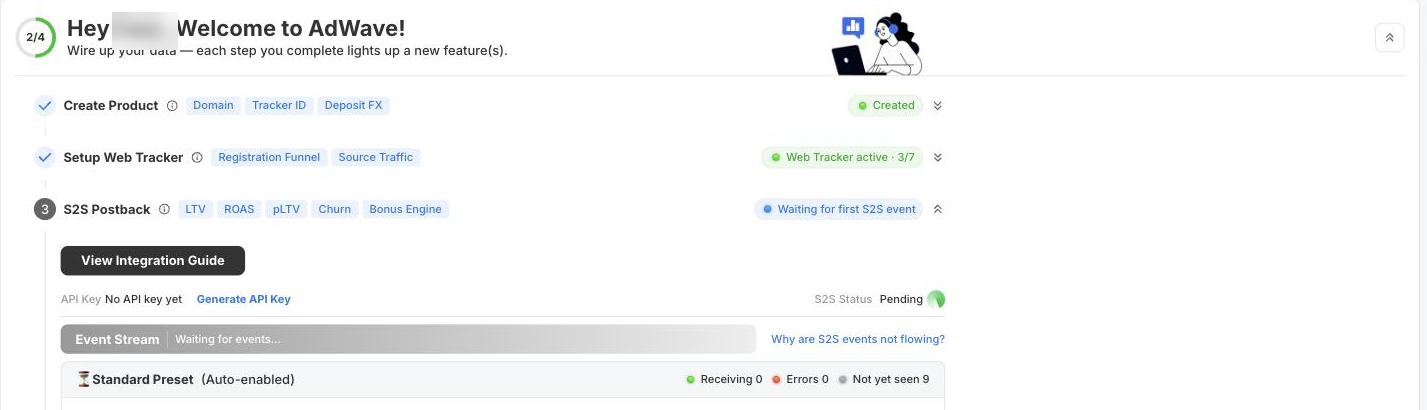
Log in to AdWave or DataPulse and go to Product. There are two places to reach the S2S settings — they show the same thing:
- Setup Wizard → Step 3 · S2S Postback, or
- Manage Product → click your product name → S2S card
Before you generate a key the panel reads API Key: No API key yet and S2S Status: Pending.
5.3 Generate the API Key
Click Generate API Key.
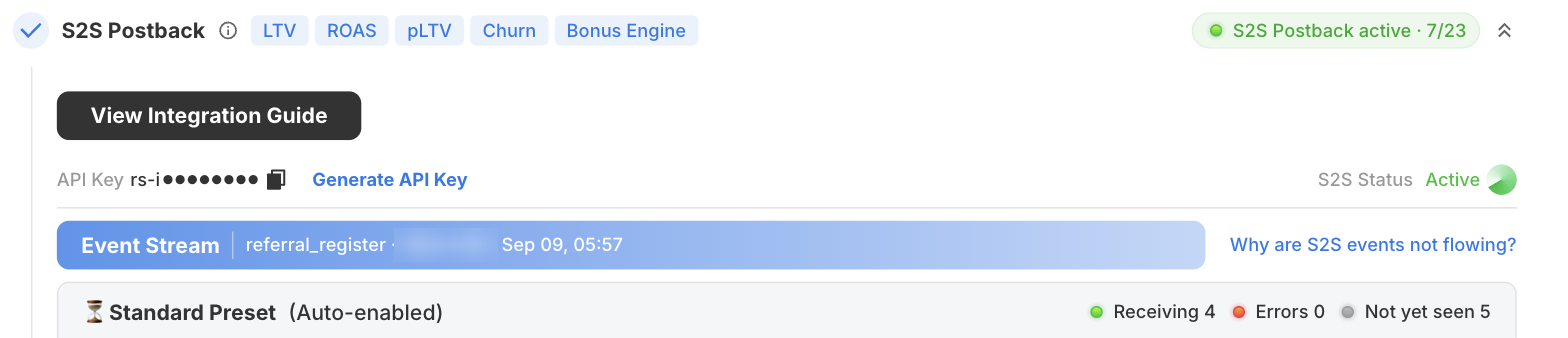
The key is issued immediately and shown masked — rs-i●●●●●●●● — with a copy button (⧉) beside it. Copy it now and store it in your secret manager.
You can also generate a key from the Manage Product table: the API Key column shows -- when none exists, and the row action button generates one. Once issued, the column shows how many keys are active (e.g. 1 Active).
Treat the API Key like a password
It authenticates writes to your account's data. Store it server-side in a secret manager. Never put it in frontend code, a mobile app binary, a tag manager, or a public repo. Generating a new key does not automatically revoke the old one — rotate deliberately.
5.4 Send events from your backend
| Base host | https://datapulse-api.revosurge.com |
| Endpoints | /v3/s2s/event (single) · /v3/s2s/batch (batch) |
| Method | POST |
| Auth header | X-API-Key: <your key> |
| Rate limit | 60 requests per minute, per API key |
Every event needs, at minimum:
| Field | Why |
|---|---|
identity.client_user_id | Your stable account ID — must match the user_id you pass to the Web Tracker |
identity.click_id | The RevoSurge click identifier. Required for the event to be attributed to a campaign — send it for every user you captured one for. Organic users won't have one. |
event | Which event from the catalog |
timestamp | When it happened, in Unix milliseconds (13 digits) |
context.ip_address | The user's IP, for geo and fraud signals |
These five are the fields most commonly missing when the API returns 400.
Full request/response schemas, field types, and per-event payloads: Server Events API (v3).
Use the same user ID as the Web Tracker
client_user_id in S2S must be the exact same value as user_id in the Web Tracker. If they differ, RevoSurge sees two separate users and attribution breaks. This is the single most common S2S integration error.
Where does click_id come from?
The Web Tracker stores it from the landing URL and exposes it via getClickid(). Capture it at registration, store it against the account in your database, and send it with every S2S event for that user. See the Web Tracker SDK Reference.
6. Verify in the portal
Go back to Product → Setup Wizard → Step 3 · S2S Postback.
- S2S Status flips from Pending to Active once we receive a valid authenticated event.
- The Event Stream bar shows the most recent event with its name, user ID, and timestamp.
- Each preset shows Receiving / Errors / Not yet seen counts, and each event in the catalog shows when it was last seen.
- The step badge changes from Waiting for first S2S event to S2S Postback active · n/23.
If nothing arrives
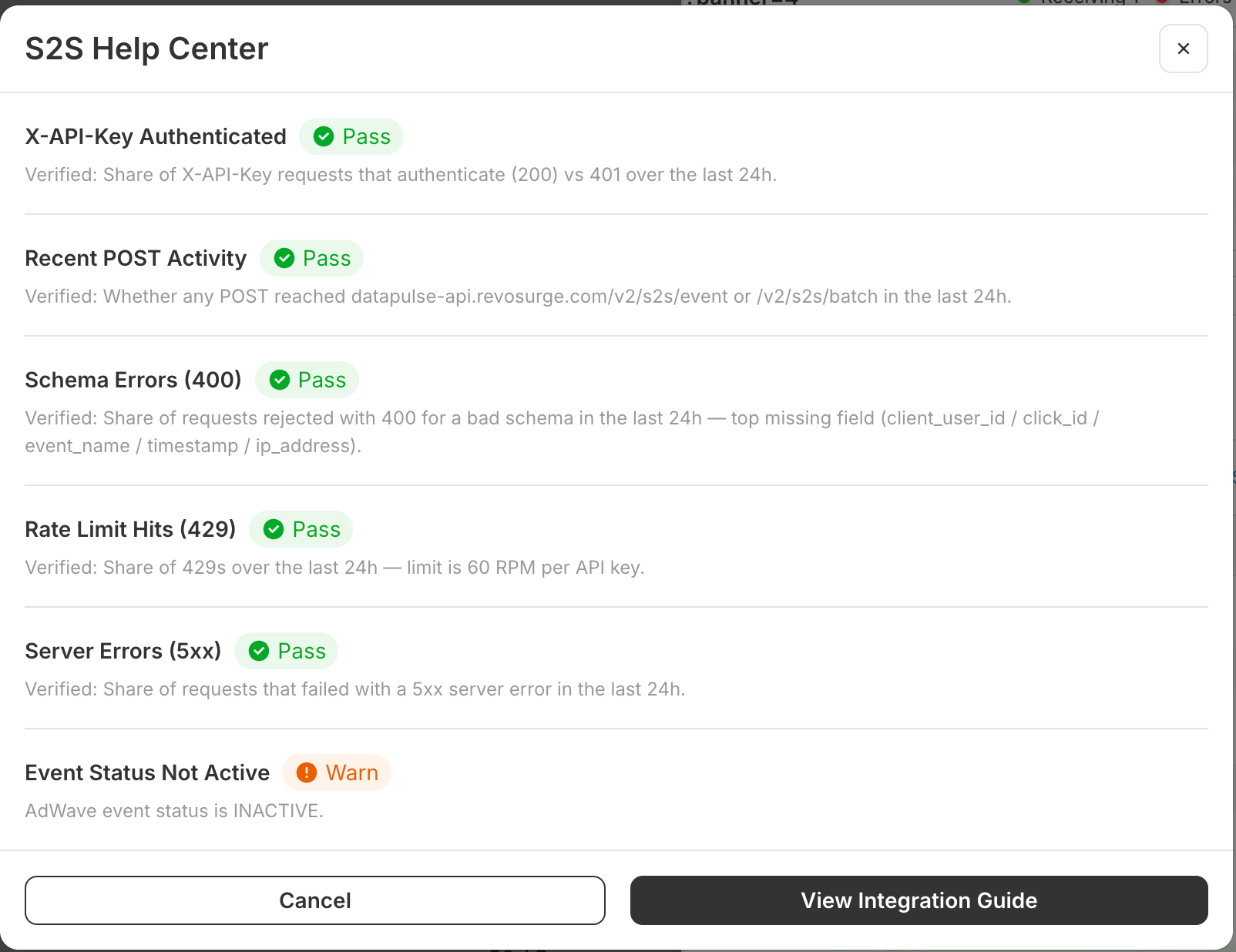
Click Why are S2S events not flowing? to open the S2S Help Center. It runs six checks against the last 24 hours of your traffic.
| Check | What it verifies | If it fails |
|---|---|---|
| X-API-Key Authenticated | Share of X-API-Key requests that authenticate (200) vs 401 | Wrong or revoked key, or the header isn't named exactly X-API-Key |
| Recent POST Activity | Whether any POST reached /v2/s2s/event or /v2/s2s/batch | Your backend isn't calling the endpoint — check egress firewall rules and the URL |
| Schema Errors (400) | Share of requests rejected for a bad schema — top missing field named | Add the missing field. Most often client_user_id, click_id, event_name, timestamp, or ip_address |
| Rate Limit Hits (429) | Share of 429s — limit is 60 RPM per API key | Batch your events via /v2/s2s/batch and add retry with backoff |
| Server Errors (5xx) | Share of requests that failed with a 5xx | Transient on our side — retry with exponential backoff. Persistent 5xx: contact support |
| Event Status Not Active | Whether the AdWave event status for this Product is active | A warning, not a blocker — events are arriving but the Product is not yet marked active for campaign use |
7. The event catalog
There are 24 events across two presets. Each shows in the portal as Receiving, Errors, or Not yet seen.
The iGaming preset has to be enabled for your Product
Standard (9 events) is auto-enabled on every Product. iGaming (15 events) is enabled per Product by RevoSurge on request.
deposit is an iGaming event. Until the preset is enabled, every deposit you send is rejected with 422 EVENT_DISABLED, no matter how correct your integration is — and this is not something you can fix in code.
Ask your account manager to confirm iGaming is enabled before you start building.
⭑ marks the four Basic events. Everything else is Full.
Standard Preset (9 events)
| Group | Events |
|---|---|
| User Lifecycle | ⭑ register · ⭑ login |
| Verification & Consent | email_verified, phone_verified, marketing_consent_updated |
| App Lifecycle | app_install, app_open, app_uninstall, push_permission_updated |
iGaming Preset (15 events)
| Group | Events |
|---|---|
| User Lifecycle | session_ended, vip_tier_changed |
| Verification & Consent | kyc_completed, kyc_rejected, account_blocked, account_unblocked |
| Financial | ⭑ deposit_initiated · ⭑ deposit · deposit_failed, withdraw |
| Gaming | bet |
| Bonus Lifecycle | bonus_offered, bonus_claimed, bonus_completed, bonus_cashed_out |
The portal's event grid shows one fewer than the catalog accepts
The Setup Wizard currently lists 14 iGaming events and reads n/23. deposit_initiated is accepted by the API and fully specified — it just isn't drawn in that grid yet. Send it; it will be stored. See iGaming events for its fields.
About deposit_initiated — a deposit the player started but has not settled. It shows you where players drop out of the cashier. context.transaction_id is required and must match the transaction_id on the later deposit or deposit_failed, so the attempt and its outcome can be tied together.
Order to add them in
Start with the four Basic events. Then withdraw and bet — those two take you from ROAS to true player value. Verification and bonus events last; they sharpen Predicted LTV, Churn and the Bonus Engine but nothing depends on them to start.
Field-level definitions for every event: Standard events · iGaming events
8. API versions
| Version | Status | Timestamp format |
|---|---|---|
| v3 | Current — use for all integrations | Unix milliseconds |
| v2 | Deprecated on 18 October 2026 | Unix seconds |
Start new integrations on v3. If you're on v2, see Migrating from v2.
Confirming you are live
The Event Stream bar and the per-event last seen timestamps in the S2S card are read from events we have actually stored. They are the authoritative check that your integration is working, on either version.
Next steps
- Server Events API (v3) — endpoints, schemas, examples
- Envelope & base properties — the fields on every event
- Catalog & validation — how events are validated
- Standard events · iGaming events
- Migrating from v2
Related
- Tracking overview — all four tracking methods compared
- Install the Web Tracker — the browser-side half
- Partner Postback API — conversions from affiliates and MMPs